Installatie-instructie
Hallo.
Ben je een moedertaalspreker? Zou je ons willen helpen?
We zijn erg dankbaar voor vertalingen, proeflezen of afbeeldingen / screenshots om onze installatiehandleiding te helpen verbeteren. Of een ander advies.
Aarzel niet om ons een e-mail te sturen: info@scdb.info. Bij voorbaat dank.
1 Software POI Loader installeren
- Installeer eerst de software POI Loader van Garmin. Deze kan je terugvinden op de website van Garmin-Support en is aldaar gratis te downloaden:
POI Loader voor Windows downloaden
POI Loader voor Mac downloaden
2 Flitserbestanden downloaden
- Alle Kenwood-apparaten zijn gebaseerd op Garmin-software. De installatie is hetzelfde als met een Garmin-apparaat.
Op onze Kenwood-productpagina kan je de stationaire (vaste) en/of mobiele flitsers downloaden.
Beslis zelf, welke data je nodig hebt.
De download voor mobiele flitsers start automatisch.
De download voor stationaire flitsers heeft extra keuzemogelijkheden (zie volgende stappen).

- Stationaire flitsers downloaden: kies in stap 1 alle gewenste landen.
Gebruik de voorselectie of kies individuele landen door tijdens het selecteren de [CTRL]-toets ingedrukt te houden.

- In de 2de stap wordt bepaald, hoe de camera speed data worden weergegeven op je navigatietoestel.
Kies je voor de weergave als Scheiding in aparte categorieën (meerdere bestanden),...
...dan bekom je aparte symbolen voor elke type flitscamera (vb. traject-, rood licht-, snelheidsflitser) en de databank wordt in meerdere bestanden opgedeeld. Voorbeeld: SCDB_Traject_70.csv, ..., SCDB_Rood licht.csv, SCDB_Rood licht_20.csv, ..., SCDB_Snelheid_50.csv, ..., SCDB_Tunnel.csv, enz.
Kies je voor de weergave als Scheiding in snelheids- en rood lichtflitser (2 bestanden),...
...dan worden de flitsers op het navigatietoestel weergegeven als een snelheids- of een rood lichtsymbool. Voorbeeld: SCDB_Rood licht.csv, SCDB_snelheid.csv
Kies je voor de weergave als Alle flitspalen in een categorie (1 bestand) of Alle flitsers als ongeval risicopunt-categorie (1 bestand),...
...dan worden alle flitsers met hetzelfde symbool weergegeven. De databank bestaat dan slechts uit 1 bestand: SCDB_camera.csv of SCDB_gevaar.csv
Opmerking: Het aantal flitsers (POIs) blijft steeds hetzelfde - onafhankelijk hoeveel bestanden de download bevat.
Bovendien bieden wij symbolen aan in verschillende groottes: klein (22x22 en 24x24), medium (32x32) en groot (48x48).
De meeste Garmin toestellen gebruiken 8 Bit symboolbestanden, sommige toestellen slechts 4 Bit. Test zelf even, wat het best past voor uw navigatietoestel.

- In stap 3 klik je op de knop Download nu.
Sla het bestand kenwood.zip op in een map van je harde schijf.
Opmerking: In de meeste gevallen zal het bestand opgeslagen worden in de download map van je computer. Soms kan je de opslag plaatst zelf uitkiezen (dit is afhankelijk van je persoonlijke browser instellingen). Wanneer je de Chrome Browser gebruikt, kan je met "Weergeven in map " direct de opslaglocatie bereiken.

- Als je ook de mobiele flitsers wenst te downloaden, sla dan het bestand kenwood-mobile.zip eveneens op in een map van je harde schijf.

- In ons voorbeeld hebben wij stationaire en mobiele flitsers gedownload.
De bestanden kenwood.zip en kenwood-mobile.zip werden opgeslagen in de downloadmap.

- Pak de ZIP-bestanden uit. Hierdoor bekom je de mappen kenwood en kenwood-mobile.
Uitpakken met een Windows computer: ZIP-bestand aanklikken met rechtermuistoets > Bestanden uitpakken...
Uitpakken met een Mac computer: Dubbelklik op het ZIP bestand.

- De map kenwood bevat de stationaire (vaste) flitsers. Er zijn hier zowel *.bmp en *.csv bestanden terug te vinden. Het aantal en de grootte van de bestanden is afhankelijk van welke landen er werden geselecteerd en van de gekozen categoriescheiding (Stap 2).
Opmerking: wanneer Microsoft Excel op je computer is geïnstalleerd, dan worden de *.csv bestanden weergegeven met een Excel-symbool. U hoeft zich hierover geen zorgen te maken! We gaan deze bestanden niet openen met Excel, anders kan het bestandsformaat beschadigd worden en is het bestand daardoor onbruikbaar.

De map kenwood-mobile bevat de mobiele flitsers. Deze map is opgedeeld in diverse sub mappen.
Kies hier slechts één bepaald land uit.
Belangrijk: Wenst u meer dan één land te installeren, dan moet je steeds de bestanden selecteren uit de map All countries!

- Verplaats de bestanden voor de stationaire en de mobiele flitsers voor de installatie met POI Loader naar een verzamel map.
(Wanneer je uitsluitend stationaire flitsers wil installeren dan kan je deze stap 10 overslaan.)
n het voorbeeld hebben wij een nieuwe map aangemaakt SCDB-Flitsers op het bureaublad.
In deze verzamelmap plaatsen wij nu de verschillende bestanden, die met POI Loader op het Kenwood apparaat moeten geïnstalleerd worden.
Vaste flitsers: markeer alle *.csv en *.bmp bestanden CTRL+A en verplaats deze naar SCDB-Flitsers:

Mobiele flitsers: Kies 1 land (of de map "Alle landen"), markeer de *.csv bestanden verplaats deze naar de map SCDB-Flitsers:

Mobiele flitsers: Kies de map met de juiste symboolgrootte (vb. mobiel_32x32_8bit_medium) en verplaats alle *.bmp bestanden naar SCDB-Flitsers:

Uiteindelijk bevat de verzamelmap SCDB-Flitsers alle gewenste bestanden:

3 USB-stick of SD-kaart vorbereiden
Belangrijke opmerking:
De installatie van de flitspaalgegevens wordt uitgevoerd met een USB-stick of een SD-kaart.
Het vereiste opslagmedium is afhankelijk van het apparaat en kan vooraf niet worden bepaald. Voorbeelden:
| Installation met USB-stick | Installation met SD card |
| Kenwood DNN 9230 DAB | Kenwood DNX 4180 BTS |
| Kenwood DNR 3190 BTS | |
| Kenwood DNR 4190 DABS | |
| Kenwood DNX 451 RVS | |
| Kenwood DNX 4190 DABS | |
| Kenwood DNX 5160 DABS | |
| Kenwood DNX 5190 DABS | |
| Kenwood DNX 7150 DAB | |
| Kenwood DNX 7190 DABS | |
| Kenwood DNX 9190 DABS | |
Als de installatie niet met één optie werkt, probeer dan de tweede optie!
- Formatteer een USB-stick of een SD-kaart in het formaat FAT32 (niet: FAT of exFAT).
Maak geen gebruik van de optie snelformatteren.
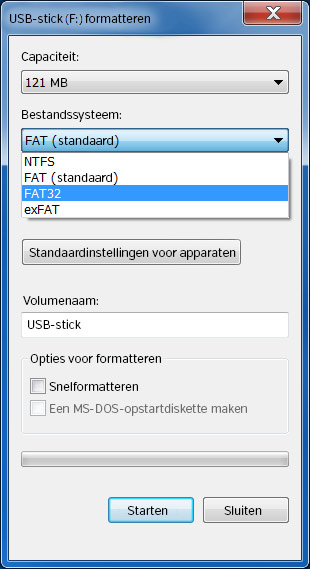 of
of
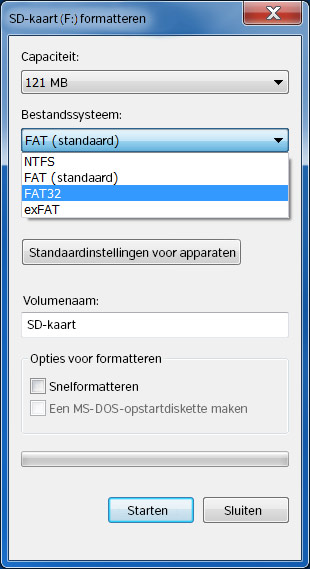
- Maak een nieuwe map aan op de USB-stick / SD-kaart met de naam POI.
Maak een nieuwe map aan op de USB-stick / SD-kaart met de naam Garmin.
Maak een nieuwe submap aan in de map Garmin met de naam POI.

4 Flitserbestanden installeren
- Start het programma POI Loader.
Klik op Volgende.

- Kies als opslaglocatie Computer.
Bij de vraag, of (eventueel) aanwezige POIs mogen overschreven worden met de nieuwe POIs, antwoordt je met "Nieuwe gebruiker-POIs op het toestel installeren". Dit heeft geen gevolgen voor de reeds geïnstalleerde POIs (tankstations, apotheken, enz.) op het toestel.

- Kies de plaats, alwaar het gebruiker-POI-bestand opgeslagen moet worden.

Wij kiezen het Bureaublad (Desktop), om het bestand later snel terug te vinden.


- Klik in het volgende venster op de knop Bladeren....
Kies hier de map alwaar zich de uitgepakte flitsers bevinden.

In ons voorbeeld is dit de verzamelmap SCDB-Flitsers op het bureaublad.

- Geef een naam voor het nieuwe POI-bestand, bepaal de eenheden en de instellingsmode.
Wij raden aan de instellingsmode Express te gebruiken.

Express Mode
In deze mode kiest POI Loader alle instellingen automatisch. Klik op Volgende en het gebruikers-POI-bestand wordt met de Garmin-standaardinstellingen aangemaakt.
Handmatige Mode
In de handmatige mode kunnen de instellingen voor de verschillende flits categorieën afzonderlijk ingesteld worden. Dit vergt uiteraard meer tijd. Je hebt dan de mogelijkheid, om een waarschuwing te krijgen wanneer je een ingestelde snelheid overschrijdt, of je geeft voor elke categorie een afstand in, alvorens er een waarschuwing wordt gegeven.

Aanbevolen worden de volgende instellingen, je kan natuurlijk naar behoefte de waarden vrij aanpassen:
| 100 m | 10-30 km/h flitser
(vb. SCDB_Traject_30.csv, SCDB_Rood licht_30.csv, SCDB_Snelheid_30.csv, ...) |
| 250 m | 40-80 km/h flitser
(vb. SCDB_Traject_50.csv, SCDB_Rood licht_40.csv, SCDB_Snelheid_60.csv, ...) |
| 500 m | 90-130 km/h flitser
(vb. SCDB_Traject_90.csv, SCDB_Rood licht_90.csv, SCDB_Snelheid_130.csv, ...) |
| 500 m | dynamische flitser
(vb. SCDB_Traject.csv, SCDB_Snelheid.csv) |
| 100 m | Rood licht-flitser
(vb. SCDB_Rood licht.csv) |
- Na klikken op de knop Volgende worden de bestanden ingelezen en het POI-bestand aangemaakt.
POI Loader toont aan het einde het aantal geïnstalleerde POIs.


- Het bestand poi.gpi bevindt zich nu op het bureaublad.
De bestandsnaam is afhankelijk van de naam die je in stap 17 van deze beschrijving hebt ingesteld.
Kopieer het bestand naar de poi-map van de SD-kaart "[SD-kaart]/Garmin/POI" of de USB-stick "[USB-stick]/Garmin/POI".

Verwijder de SD-kaart of USB-stick uit de computer.
5 Benaderingsalarmen activeren
Plaats de SD-kaart of USB-stick in het Kenwood-apparaat.
- Het uiterlijk van de menu's is altijd afhankelijk van de softwareversie. Onze foto's tonen een Garmin-apparaat.
Het menu van Kenwood-apparaten lijkt hier sterk op.
Ga in het hoofdmenu naar Instellingen > Hulp voor de bestuurder > Gevarenzonealarm.
Voor sommige apparaten kan dit ook zijn: Instellingen > Gevarenzonealarm > Audio.


Als Alarmtype adviseren we de instelling "Continue toon" aan.

Onder Waarschuwingen moet je de "Eigen nuttige punten" activeren en de "Garmin-flitspalen" deactiveren.

- Om te controleren, of de flitsers correct geïnstalleerd zijn, ga je in het hoofdmenu naar Waarheen? > Categorieën > Eigen nuttige punten.
Kies een categorie en aansluitend een flitser-POI.


Jou Kenwood is nu klaar voor een veilige rit.
6 Flitsers actualiseren
Wens je op een later tijdstip de flitsers te actualiseren, dan gebeurt dit op dezelfde wijze als bij de eerste installatie.
Installeer eenvoudigweg de nieuwe gedownloade bestanden opnieuw met POI Loader. Hierdoor worden de oudere bestanden eenvoudigweg overschreven.
Dat is het. Alle instellingen in het navigatie toestel blijven hierbij behouden.
Wij adviseren om de bestanden maandelijks te actualiseren, zo ben je steeds veilig onderweg.
7 Problemen oplossen
Heb je de installatie geprobeerd met een SD-kaart en een USB-stick?
Je moet altijd beide opties proberen! Als de installatie niet met één optie werkt, probeer dan de tweede optie.
Voorbeelden:
Kenwood DNX4180BTS (gebruik SD-kaart)
Kenwood DNX5160DABS (gebruik USB-stick)
Kenwood DNX7150DAB (gebruik USB-stick)
De software POI Loader maakt tijdens de installatie het bestand poi.GPI aan op je navigatie toestel.
Bij elke nieuwe installatie met POI Loader wordt dit bestand opnieuw aangemaakt en op het navigatie toestel overschreven.
Let ervoor op, dat alle te installeren bestanden (vb. vaste flitsers, mobiele flitsers, tankstations, enz.) voor de installatie aanwezig zijn in de gezamenlijke map op je harde schijf.
Anders zou je eerst de vaste flitsers installeren en aansluitend ga je deze weer overschrijven met de installatie van de mobiele flitsers.
- De SCDB-flitsers moeten in het formaat poi.GPI opgeslagen worden in de map "[SD-kaart]/Garmin/POI" of "[USB-stick]/Garmin/POI".
In enkele gevallen kan het voorkomen, dat de POI Loader het bestand poi.GPI opslaat in de map "[SD-kaart]/POI" of "[USB-stick]/POI".
Indien er dan problemen zijn bij de weergave van de flitsers, verplaats dan de poi-map naar de Garmin-map.


Wanneer je een andere bestandsnaam gebruikt (dus niet poi.GPI), let er voor op dat je nadien bij de actualiseringen ook nog dezelfde bestandsnaam blijft gebruiken. Anders worden er dubbele gegevens weergegeven.
Je bekomt nog steeds geen waarschuwing, nochtans heb je alle stappen van de installatiebeschrijving correct uitgevoerd alsook de foutoplossing gelezen?
Dan kan in sommige gevallen een reset helpen (terugzetten naar fabrieksinstellingen).